You want to draw a system and hand it over: a pictorial schematic made with products from the Stardraw Library, and the reports that go with it. One drawing at a time, with no projects to manage.
Build your custom design application, for AV, IT, security, control or any system you sell, with a simple monthly payment plan. There's no upfront cost, and no minimum term. Answer a few questions about what you need, name your application, and see your price.
Which of these best describes you?
Your answer fills in the questions that follow with what a business like yours usually needs. You can change any of it as you go, or skip this question and choose everything yourself.
You design and install systems with a small team. Projects hold every type of drawing, with cables, accessories and reports, and your products come from the Stardraw Library.
You keep your own product catalog and want the application tied into the rest of your business: every type of drawing including DWG, cables, accessories and reports, with drawing conversions, the AI assistant, the developer API and webhooks.
You want your customers and dealers to design with your products. A public application under your own brand, open for anyone to register, with one type of drawing, reports, the AI assistant and integration with your systems.
What do you want to draw?
Each type of drawing is a different view of the same products. Choose as many as you need: a project can hold any number of drawings of every type you choose.
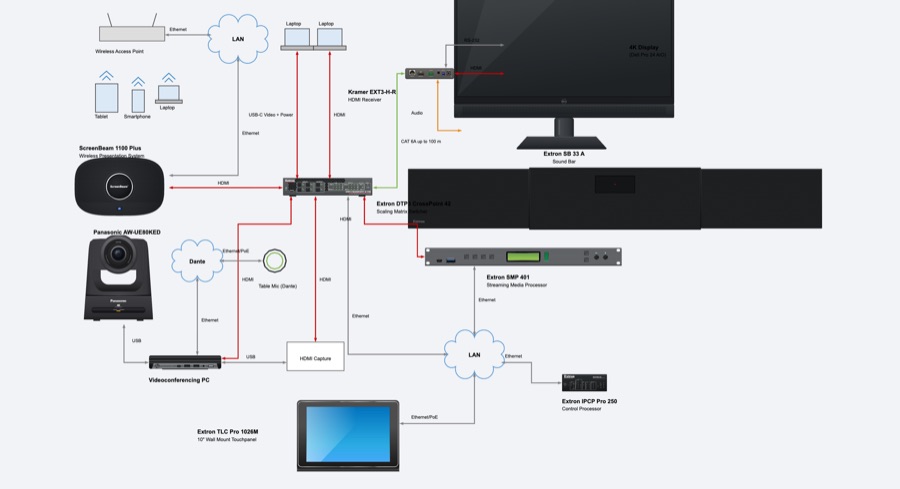
Systems drawn with pictures of the products and the lines that connect them: what connects to what, at a glance. The drawing most people start with.
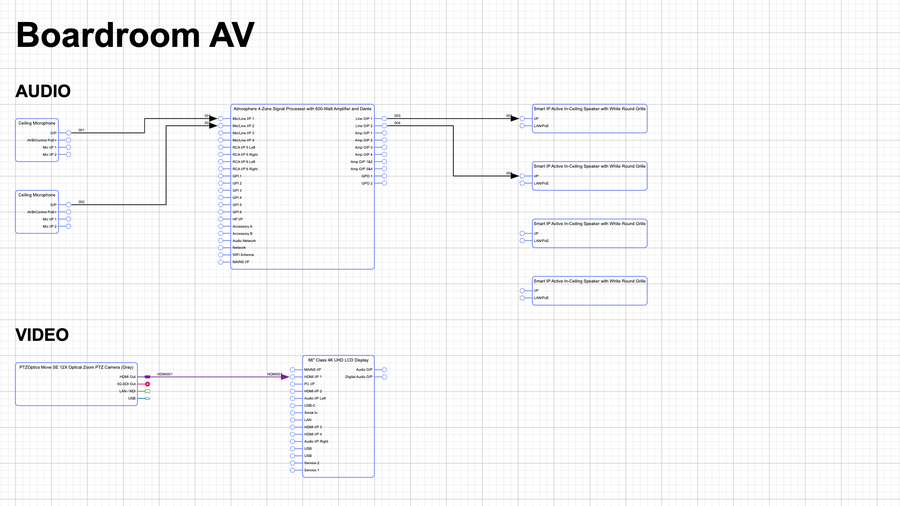
Signal-flow diagrams, where each product is a block drawn from its inputs and outputs. With Cables, every connection is checked for direction, signal and connector as you draw it.
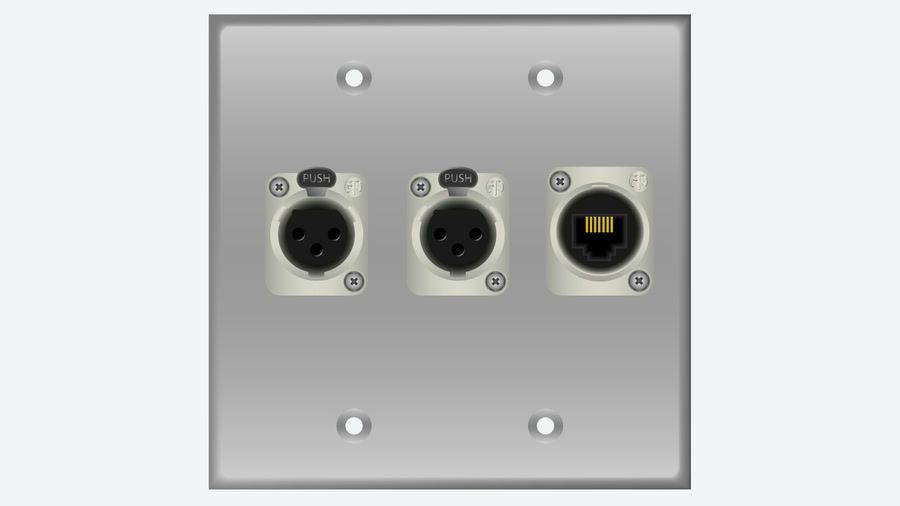
Face-on layouts of wall plates, panels and racks, drawn to size from each product’s real front and rear artwork, with the clearances around it.
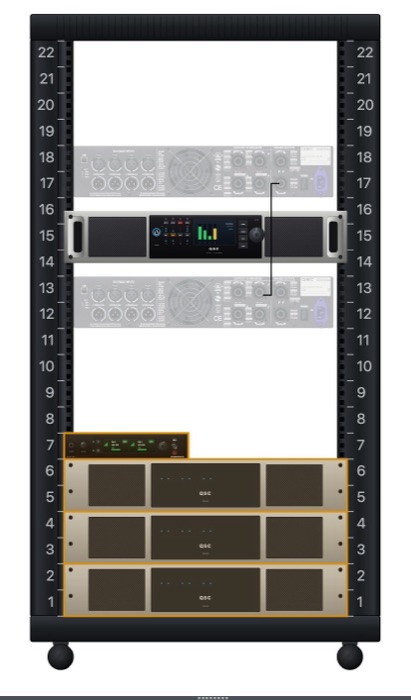
Rack elevations in rack units, with weight, center of gravity, power, heat and cable lengths checked as you mount equipment. It needs Physical Data, which is added for you.
Floor plans to scale. Set a DWG or DXF floor plan as the background and place products on it, seen from above.
CAD drawings: products with DWG symbols drawn to scale, for work that will be shared with or exported to a CAD package. It includes drawing conversions: DWG and DXF files converted to and from the Stardraw Design formats, one at a time or in batches.
How will you organize and document the work?
Choose what goes with your drawings.
A project holds any number of drawings and the list of products they share, with snapshots to keep a version as it was quoted. Without it, your users work on one drawing at a time.
Real cabling, not just lines: a catalog of connectors, signals and cable types, cables with their own IDs and labels, conduits with their fill, and ready-made cable schedules.
Quotations, orders, bills of materials, schedules and drawings, laid out the way you want them in a report designer, filled with the project’s data and delivered as PDF.
What do you need from your product catalog?
Every application has a catalog of the products its users draw with. Choose where the products come from and what is known about each one.
Pick products from Stardraw’s master catalog: thousands of products from many manufacturers, each with its symbols and settings. Or upload a spreadsheet of your inventory and have it matched. Leave this out if you will build your own catalog.
Size, weight, power, heat and mounting for every product, so that reports can total the weight and power of a system and rack layouts can check what fits.
The other products a product needs: the fixing kit for a bracket, the receiver for a transmitter. They are added with the product and appear on the bill of materials.
Search the catalog by meaning rather than by exact words: “a 4K projector for a lecture theater” finds the products that fit, whatever their descriptions say.
Do you want help with the work, or to connect to your other systems?
All four are optional. Leave them out and your application still draws, cables and reports.
An assistant built into your application that knows the project the user has open and does the work it is asked to do: finds products, places them, connects them, runs a report. Claude and other AI clients can drive the application the same way.
Your own software, or a partner’s, reading and writing projects, products and drawings: a CRM, an ERP, a website or a script, signed in on a user’s behalf.
Your systems are told the moment something happens: a project created, a snapshot taken, a user registered. No need to keep asking.
Who will use your application?
This is the difference between the Private and the Public edition. You can move between them later; nothing is deleted either way.
Users are invited by your administrator, and there is no other way in. What your application produces carries a Stardraw Cloud footer.
Anyone may register at your application’s address, there is no limit on users, and nothing your application produces carries a Stardraw Cloud footer. Branding is included. The Public edition costs more than the Private edition; your price allows for it.
How do your users sign in, and whose name is on the application?
Both are optional.
Users sign in with the account they already have — Microsoft, Google, Apple or your own company’s sign-in — instead of another password.
Your logo, your colors, your font and your own web address on the application, the sign-in page included.